Skip to content

Curfox Docs

Curfox Docs

Back to Web

Release Note 3.38.0.12

HomeRelease Note 3.38.0.12

RELEASE NOTES

49
  • Pre Release Note V3.33.0
  • Release Note V3.32.0
  • Release Note V3.31.0
  • Release Note V3.30.0
  • Release Note V3.29.0
  • Release Note V3.28.0
  • Release Note V3.27.0
  • Release Note V3.26.0
  • Release Note V3.25.0
  • Release Note V3.24.0
  • LOGIN AND START THE JOURNEY WITH CURFOX
  • Introduction to Curfox
  • What Intricate Ecosystems Thrive Along the Banks of Rivers?
  • ๐Ÿš€ New Feature Release: Billing City Override Setting
  • ๐Ÿš€ Enhanced SMS Notifications for Rescheduled Deliveries
  • ๐Ÿš€Bypass ‘Dispatch from Origin Warehouse’ Status for Invalid Destination Cases
  • ๐Ÿš€Sorting History for Enhanced Tracking
  • ๐Ÿš€Enhanced SMS Provider Configuration
  • ๐Ÿš€Rate Card Approval Option – Phase 1
  • ๐Ÿš€Warehouse Sorting Device Management
  • ๐Ÿš€WhatsApp Messaging Integration
  • ๐Ÿš€Proof Upload Feature
  • ๐Ÿš€Filter Saving Option
  • ๐Ÿš€ Release Note: V3.44.0
  • ๐Ÿš€ Release Note: V3.43.0
  • ๐Ÿš€ Release Note: Status Customization Feature
  • ๐Ÿš€ Release Note: Route Optimization Module – Web
  • Release Note โ€“ Version V3.39.0
  • ๐Ÿš€ Release Note: Instadispatch Courier Integration๐Ÿ“…
  • Release Note – Customer Data Security Module
  • Release Note – V3.38.11.1
  • Pre Release Note – V3.38.0.14
  • ๐Ÿš€ Pre Release Note – V3.38.11
  • Pre Release Note V3.38.0.13
  • ๐Ÿš€ Release Note : Add Redelivery Flag for Failed to Deliver
  • Release Note : New Curfox Rider App
  • Release Note 3.38.0.12
  • Release Note – 3.38.10
  • Release Note 3.38.0.10
  • ๐Ÿ“Œ Release Note: Redelivery Flag for Verify Failed to Deliver
  • Release 3.38.07
  • Release 3.38.08
  • ๐Ÿšš Release Note: New Dispatch Reporting Module
  • Release Note V3.38.0.6
  • ๐Ÿš€ Flag Management Feature
  • ๐Ÿš€New Status for Status Flow “Verify Failed to Deliver”
  • ๐Ÿš€ Image Scan Upload
  • ๐Ÿš€Geofencing Module
  • Release Note V3.38.6

RIDER APP

2
  • User Guide
  • Release Note : New Curfox Rider App

LOCAL RELEASE NOTES

12
  • ๐Ÿš€ Release Note: V3.44.0
  • ๐Ÿš€ Release Note: V3.43.0
  • ๐Ÿš€ Release Note: Status Customization Feature
  • Release Note โ€“ Version V3.39.0
  • Pre Release Note – V3.38.0.14
  • Pre Release Note V3.38.0.13
  • ๐Ÿš€ Release Note : Add Redelivery Flag for Failed to Deliver
  • Release Note : New Curfox Rider App
  • Release Note 3.38.0.12
  • ๐Ÿ“Œ Release Note: Redelivery Flag for Verify Failed to Deliver
  • Release Note 3.38.0.10
  • ๐Ÿš€ Pre-Deposit Merchant Invoice Approval Process

INTERNATIONAL RELEASE NOTES

7
  • ๐Ÿš€ Release Note: Status Customization Feature
  • ๐Ÿš€ Release Note: Route Optimization Module – Web
  • ๐Ÿš€ Release Note: Instadispatch Courier Integration๐Ÿ“…
  • Release Note – Customer Data Security Module
  • Release Note – V3.38.11.1
  • ๐Ÿš€ Pre Release Note – V3.38.11
  • Release Note – 3.38.10

MERCHANT PORTAL

1
  • LOGIN AND START THE JOURNEY WITH CURFOX

STAFF PORTAL

1
  • LOGIN AND START THE JOURNEY WITH CURFOX

OVERVIEW

1
  • Introduction to Curfox

USER GUIDES

1
  • ๐Ÿ“šUser Guide: WhatsApp Message API Setup
View Categories
  • Home
  • Docs
  • RELEASE NOTES
  • LOCAL RELEASE NOTES
  • Release Note 3.38.0.12

Release Note 3.38.0.12

3 min read

New Features #

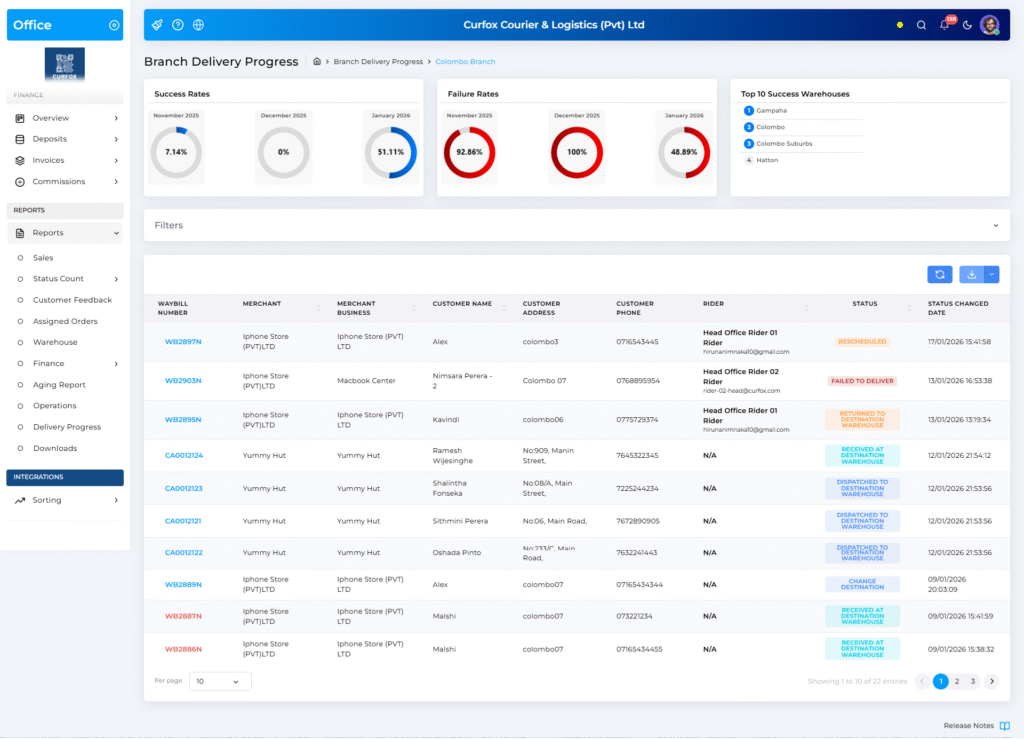
1. ๐Ÿšš Branch Delivery Progress Dashboard #

A new dashboard has been introduced to provide a clear overview of delivery performance at the branch level, helping teams monitor success and delays effectively.

Access Path
Staff Portal โ†’ Reports โ†’ Delivery Progress

Key Metrics #

  • Success Rate
    Parcels are delivered within 36 hours from the sorting warehouse.
  • Failure Rate
    Parcels taking more than 36 hours to deliver or are still pending.
  • Historical View
    Displays data for:
    • Current month
    • The previous two months

Features #

  • Top 10 Success Warehouses
    Daily-updated widget highlighting branches with the highest delivery success rates.
  • Advanced Filters
    • Merchant
    • Merchant Business
    • Status
    • Rider
  • Interactive Charts
    Clicking on charts loads detailed order data below, including:
    • Waybill Number
    • Merchant
    • Customer Details
    • Rider
    • Current Status
  • Export Options
    • Page-wise Excel export
    • Full report Excel export
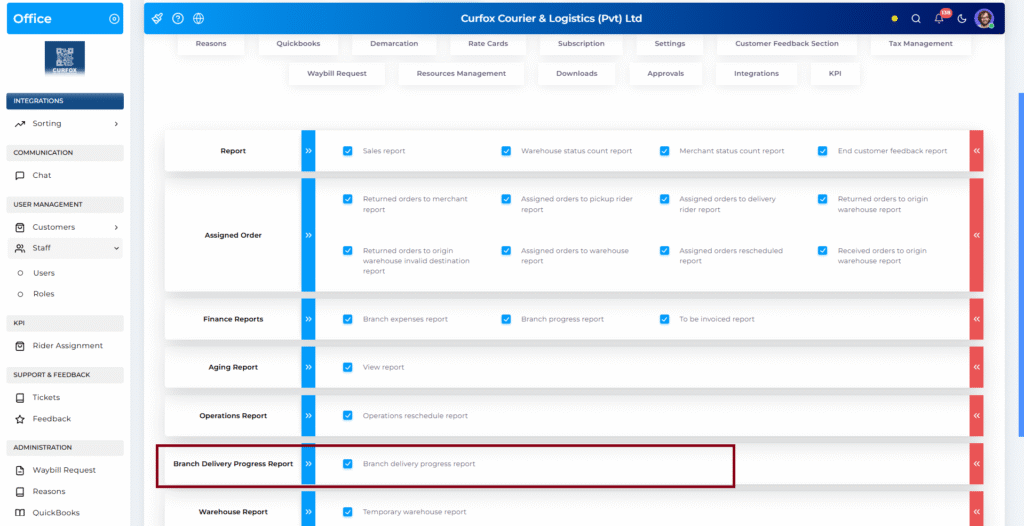
  • Permissions Control
    Manage access via:
    Staff โ†’ Roles โ†’ Manage โ†’ Reports โ†’ Branch Delivery Progress Report

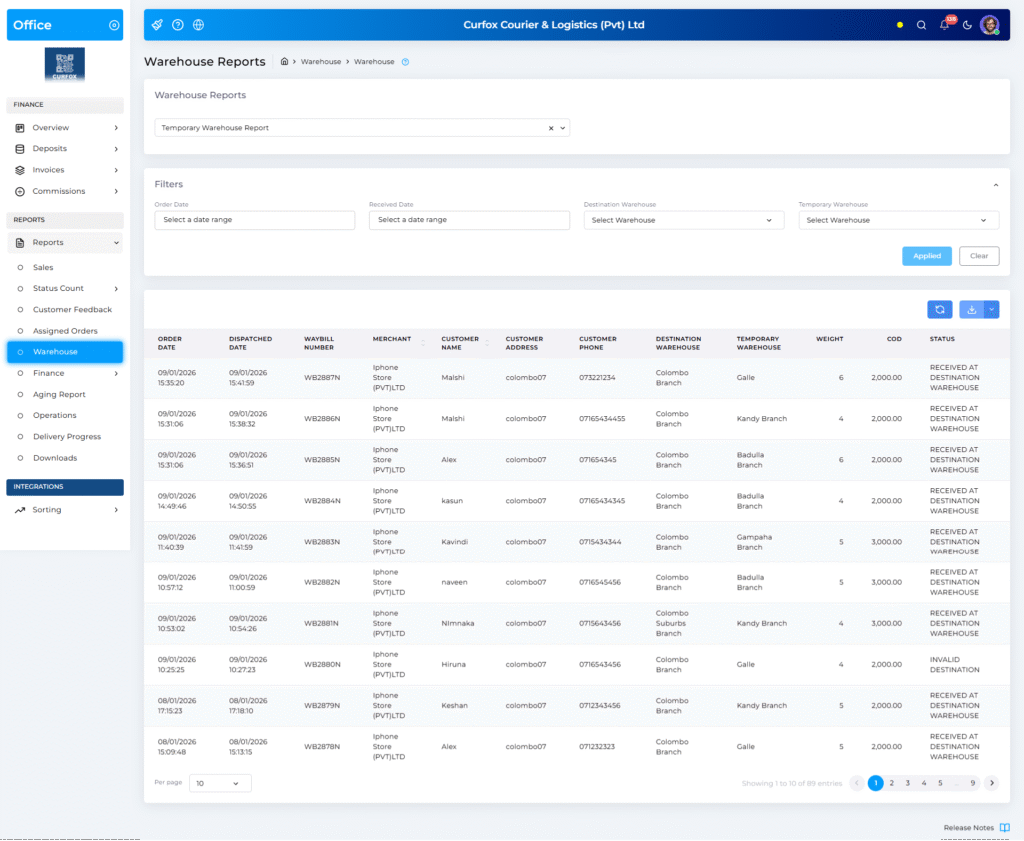
2. ๐Ÿฌ Temporary Warehouse Report #

This newly added report helps track parcels that are routed through temporary warehouses instead of their intended destination.

Access Path
Staff Portal โ†’ Reports โ†’ Warehouse โ†’ Temporary Warehouse Report

Use Case #

Ideal for identifying routing scenarios such as:

A parcel destined for Galle being temporarily routed through Matara.

Features #

  • Filters
    • Order Date
    • Receive Date at Destination Warehouse
    • Destination Warehouse
    • Temporary Warehouse
  • Displayed Information
    • Waybill Number
    • Merchant
    • Customer Details
    • Destination Warehouse
    • Temporary Warehouse
    • Weight
    • Cost
  • Export
    • Downloadable Excel report
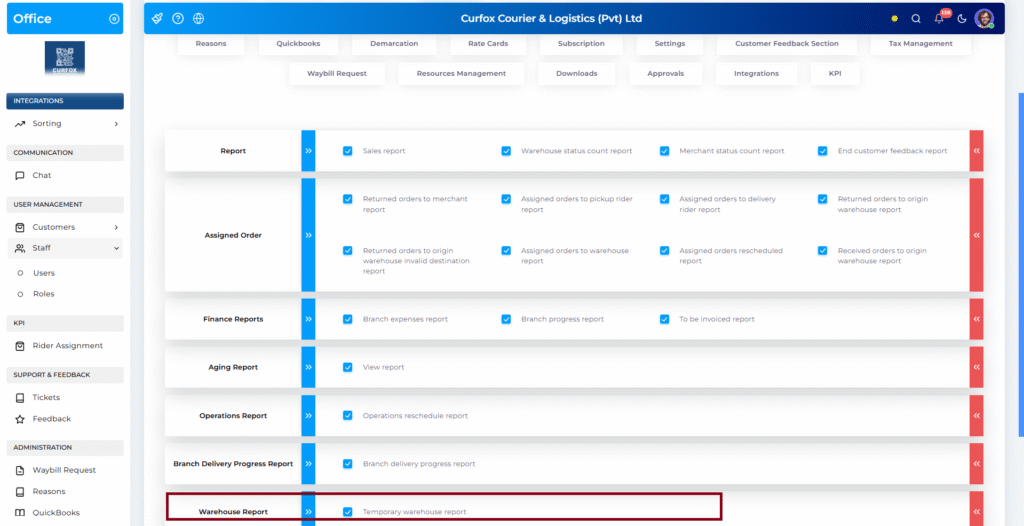
  • Permissions Control
    Configure via:
    Staff โ†’ Roles โ†’ Manage โ†’ Reports โ†’ Temporary Warehouse Report

Improvements #

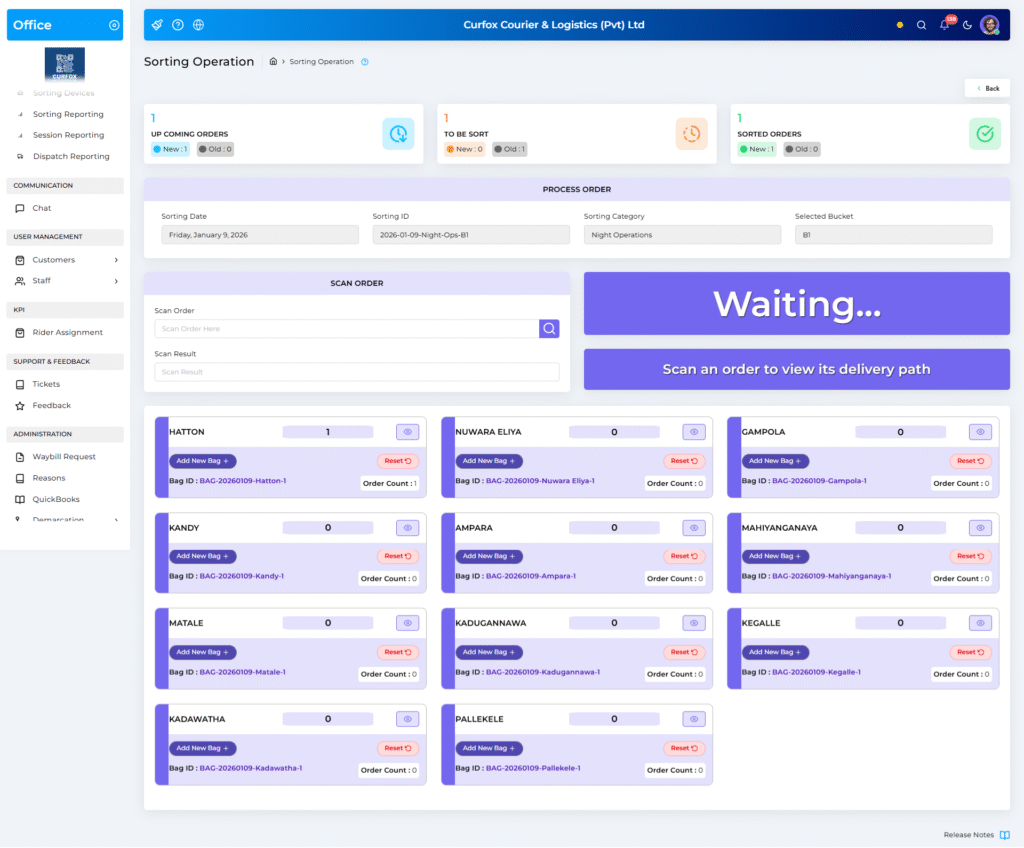
3. ๐Ÿ”„ Sorting Operation Improvements #

Enhancements have been made to improve sorting accuracy when handling large volumes of orders across multiple sessions.

Improvement #

  • Introduction of โ€œNewโ€ and โ€œOldโ€ labels in:
    • Upcoming Orders
    • To Be Sort
    • Sorted Orders

Benefit #

  • Helps staff easily differentiate:
    • Orders from the current sorting session
    • Orders carried over from previous sessions
  • Prevents order displacement and improves tracking accuracy.
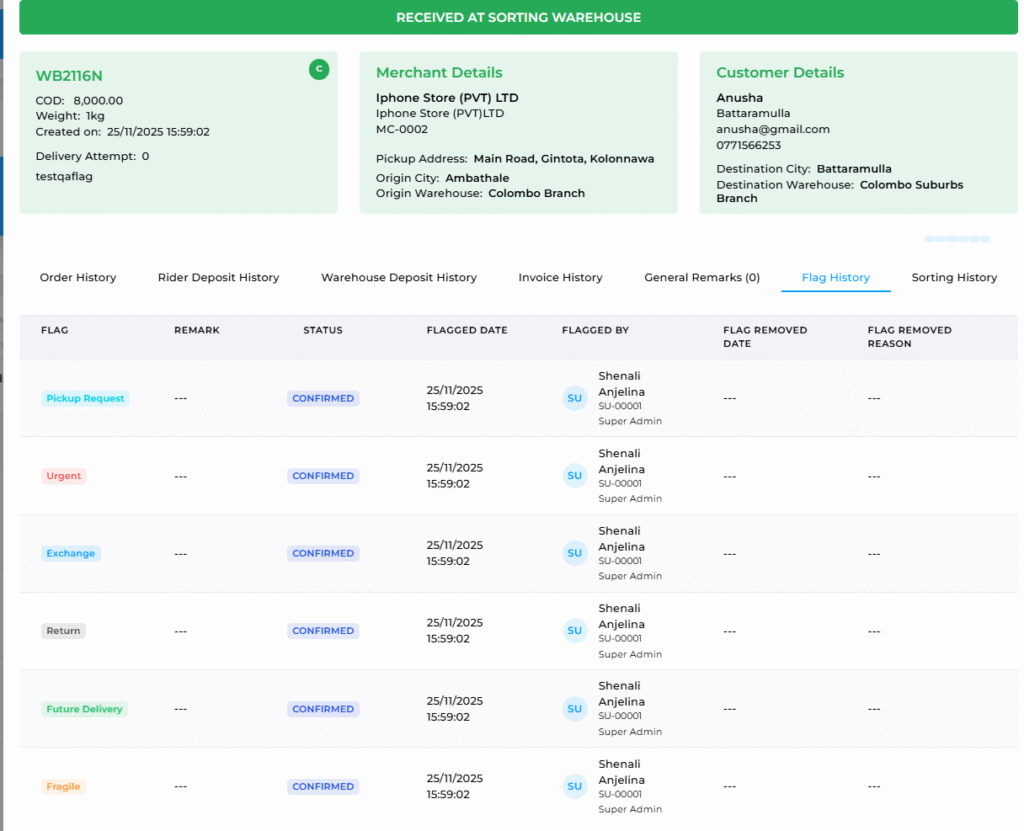
4. ๐Ÿšฉ Flag History Enhancement #

The Flag History section in order details has been enhanced for better traceability.

Access Path
Order Details โ†’ Flag History

Improvements #

  • Displays:
    • Flag Added Date
    • Flag Removed Date
    • User or system action (who added)
    • Reason for removal (e.g., auto-removed by system)

Benefit #

Provides clearer visibility into:

  • Order status changes
  • Manual actions
  • System-automated processes

5. ๐Ÿ–จ๏ธ Waybill Print Layout Fix #

A minor visual issue related to waybill printing has been resolved.

Fix Applied #

  • Removed an unintended blue background tint from the printed waybill.
  • Waybills now print cleanly in white, as intended.

6. ๐Ÿ”„ Webhook Improvements #

Weโ€™ve updated the Webhook feature visibility. Previously, the Webhook option was always visible in the sidebar regardless of whether the setting was on or off. With this update, it will now only be displayed when the feature is enabled.

Bugs #

7. ๐ŸžAction Tab Not Visible in Merchant Tickets #

Issue
The Action tab was not available within the Tickets section of the Merchant Portal, preventing merchants from performing required actions on their tickets.

Fix
The Action tab has now been restored and enabled for merchant tickets.

Impact

Merchants can now:

View available ticket actions

Respond and take necessary steps without limitations

Improves ticket handling efficiency and user experience

8. ๐ŸžNewly Created Business Not Displayed in Business List #

Issue
Merchants were able to create a new business and receive a success message, but the newly created business did not appear in the Businesses view grid.

Fix
The Businesses grid has been corrected to immediately reflect newly created businesses after successful creation.

Impact

Improves merchant confidence in business management actions

Ensures data consistency between creation and listing views

Prevents confusion caused by missing records

Updated on January 28, 2026

What are your Feelings

  • Happy
  • Normal
  • Sad

Share This Article :

  • Facebook
  • X
  • LinkedIn
  • Pinterest
Release Note : New Curfox Rider App๐Ÿ“Œ Release Note: Redelivery Flag for Verify Failed to Deliver

Powered by BetterDocs

Leave a Reply Cancel reply

Your email address will not be published. Required fields are marked *

Table of Contents
  • New Features
  • 1. ๐Ÿšš Branch Delivery Progress Dashboard
    • Key Metrics
    • Features
  • 2. ๐Ÿฌ Temporary Warehouse Report
    • Use Case
    • Features
  • Improvements
  • 3. ๐Ÿ”„ Sorting Operation Improvements
    • Improvement
    • Benefit
  • 4. ๐Ÿšฉ Flag History Enhancement
    • Improvements
    • Benefit
  • 5. ๐Ÿ–จ๏ธ Waybill Print Layout Fix
    • Fix Applied
  • 6. ๐Ÿ”„ Webhook Improvements
  • Bugs
  • 7. ๐ŸžAction Tab Not Visible in Merchant Tickets
  • 8. ๐ŸžNewly Created Business Not Displayed in Business List

ยฉ 2025 Curfox Docs - All Rights Reserved Parallax Technologies