🌐 Overview #
To strengthen data security and support privacy compliance standards, we have introduced a Customer Data Protection feature across the Curfox platform.
This update ensures that sensitive customer information (PII) such as names, phone numbers, emails, and addresses are securely masked across both Web Merchant and Office applications, allowing only authorized users to view the original data.
This significantly reduces the risk of unauthorized access and data exposure while maintaining operational efficiency.
✨ New Features & Enhancements #
🛡️ Customer Data Security Module #
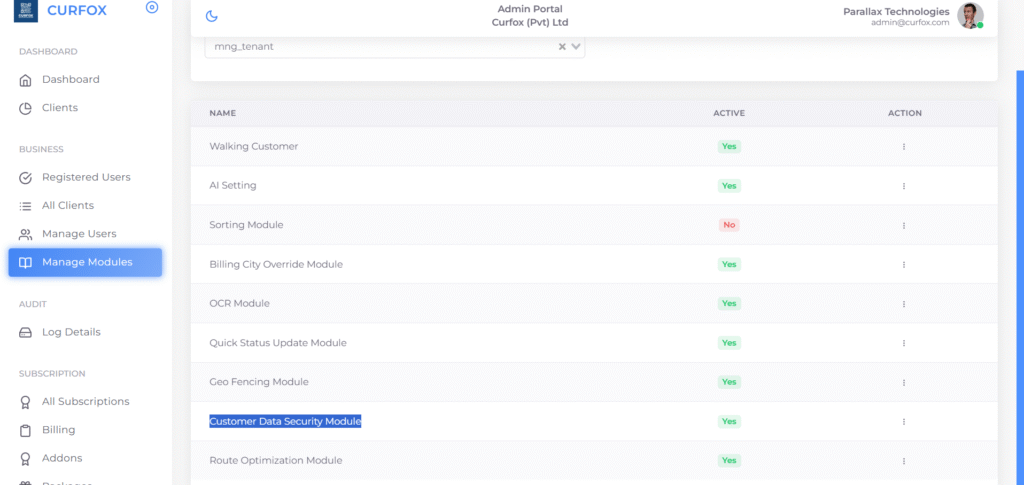
A new Customer Data Security Module has been introduced within the System Administration Panel.
Module Name:
Customer Data Security Module
Control Location:
⚙️ System Settings → Manage Modules
Functionality:
- Administrators can enable or disable the module at any time.
- When activated, the platform automatically enables advanced customer data protection mechanisms.
🔒 System-Wide Customer Data Encryption #
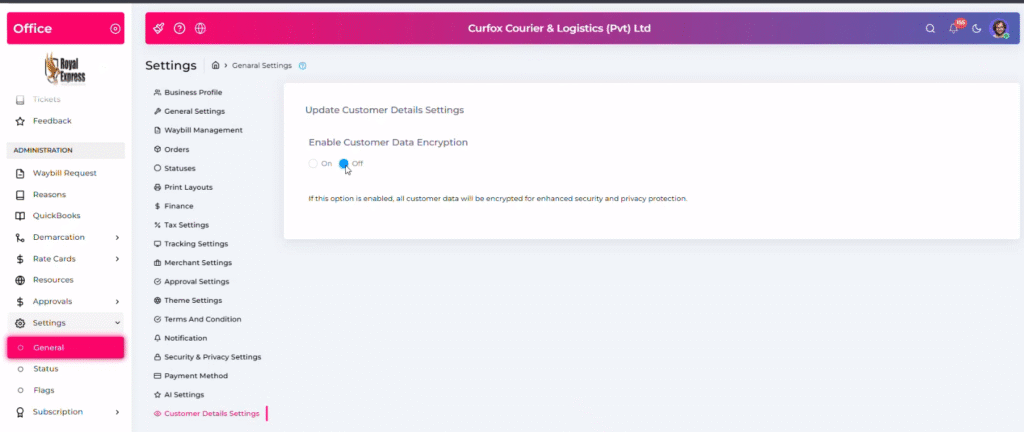
Once the module is enabled, a new encryption control becomes available in the system settings.
Setting Name:
Enable Customer Data Encryption
📍 Location:
⚙️ General Settings
Behavior when Enabled:
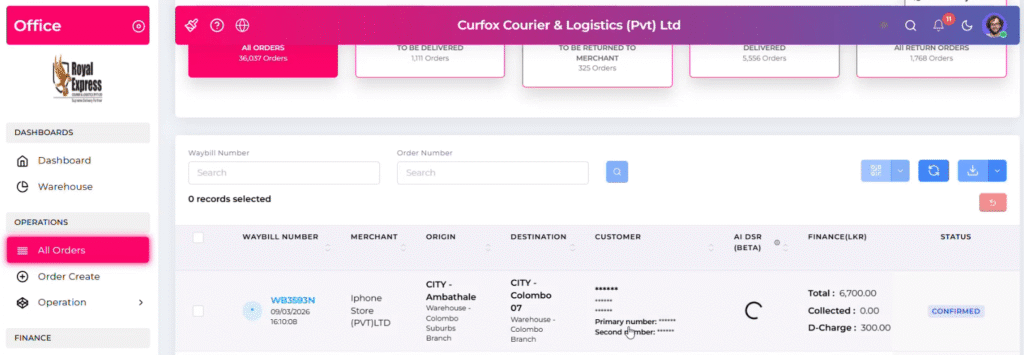
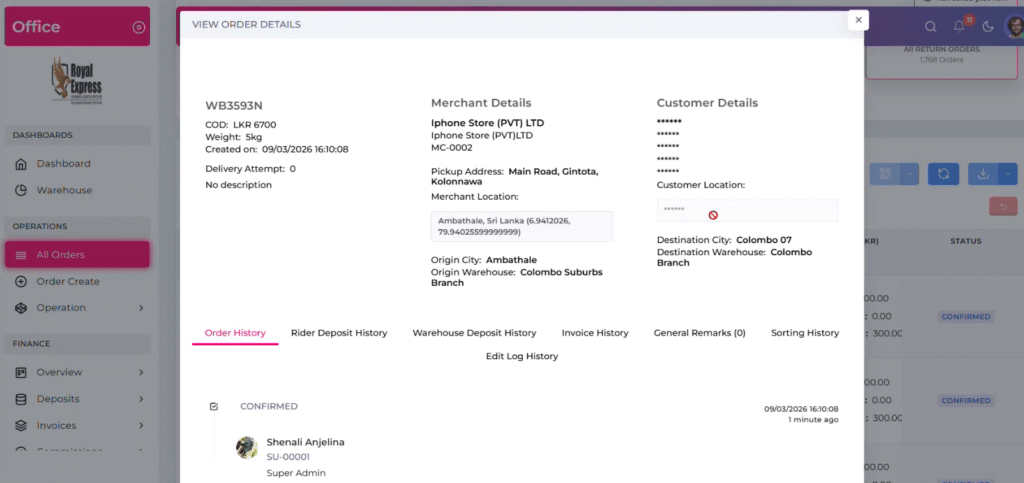
Sensitive customer data will be masked system-wide using asterisks.
Example masking:
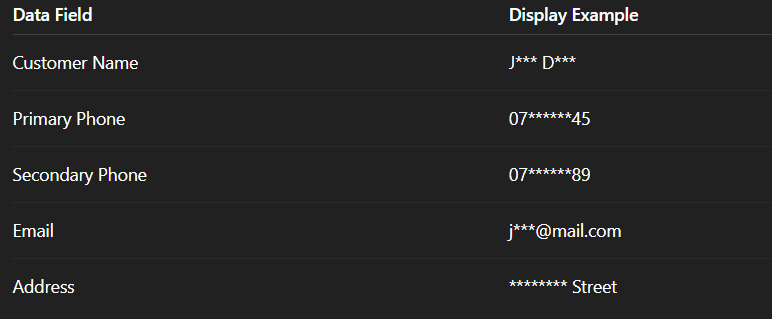
| Data Field | Display Example |
|---|---|
| Customer Name | J*** D*** |
| Primary Phone | 07******45 |
| Secondary Phone | 07******89 |
| j***@mail.com | |
| Address | ******** Street |
This masking applies consistently across all modules and interfaces.
👤 Role-Based Access Control (RBAC) for Decryption #
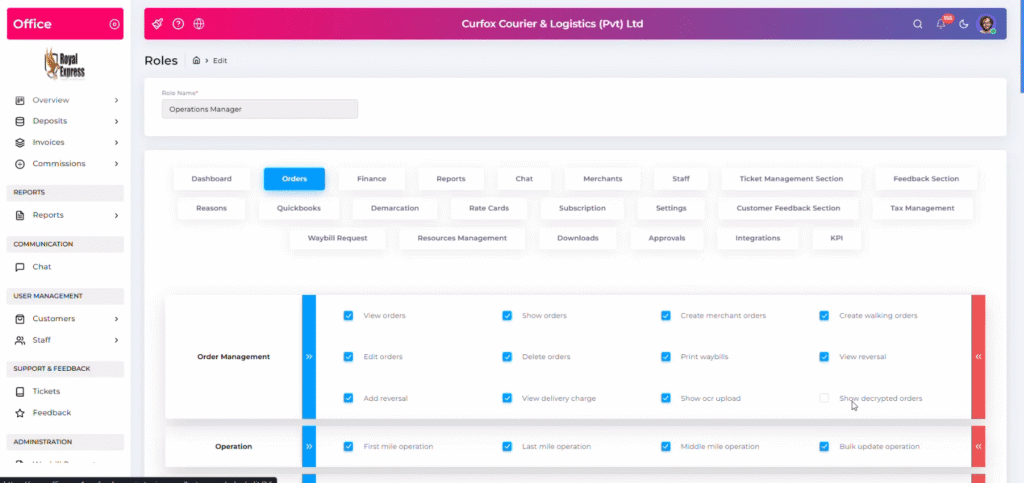
To ensure that operational teams can still perform their duties when necessary, we introduced role-based access to view decrypted data.
New Permission:
🔑 Show Decrypted Orders
Functionality:
Users granted this permission can:
- View original customer information
- Bypass the global masking rule
- Access decrypted data for operational or administrative purposes
Typical Roles with Access:
- Super Admin
- System Admin
- Authorized Operations Managers
📍 Configuration Path:
User Management → Roles → Orders Tab
📍 Impacted Areas in the Platform #
Customer data masking will now apply to the following major modules across Curfox:
📦 Order Management #
- All Orders Table
- View Order Modal
🚚 Operations #
Customer data will be masked in all operational workflows including:
- First Mile Operations
- Middle Mile Operations
- Last Mile Operations
- Reports Sections
💰 Finance Module #
Customer data protection now extends to financial workflows.
Merchant Overview #
Customer details linked to merchant transactions are masked.
Deposits & Invoices #
Masked data will appear in:
- Branch Deposit Records
- Generated Invoice Documents
📜 Order History #
Even when reviewing historical actions:
- Customer data remains masked based on encryption settings
📊 Reports #
The encryption feature also applies to report generation and exports.
Affected reports include:
- Assigned Orders Reports
- Operations Reports
- Customer Feedback Reports
- Status Count Reports
📥 Exported Reports #
Exports now follow the encryption rules.

| Scenario | Export Result |
|---|---|
| Encryption Enabled + No Permission | Masked Data |
| Encryption Enabled + Permission | Full Data Visible |
Supported export formats:
- Excel
⚠️ Important Notes & Known Constraints #
🕘 Historical Orders #
Orders created before encryption was enabled will remain visible in their original form.
Encryption rules only apply to orders processed after activation.
✍️ Receiver Name Masking #
In some delivery statuses:
- Manually entered Receiver Names may not yet be automatically masked.
🔐 Security Impact #
This update significantly improves:
✅ Customer data privacy
✅ Protection of Personally Identifiable Information (PII)
✅ Compliance readiness for data protection standards
✅ Operational data security across web and mobile systems
✨ Curfox continues to enhance platform security while ensuring smooth operations for logistics teams and merchants.


