Skip to content

Curfox Docs

Curfox Docs

Back to Web

Pre Release Note – V3.38.0.14

HomePre Release Note – V3.38.0.14

RELEASE NOTES

49
  • Pre Release Note V3.33.0
  • Release Note V3.32.0
  • Release Note V3.31.0
  • Release Note V3.30.0
  • Release Note V3.29.0
  • Release Note V3.28.0
  • Release Note V3.27.0
  • Release Note V3.26.0
  • Release Note V3.25.0
  • Release Note V3.24.0
  • LOGIN AND START THE JOURNEY WITH CURFOX
  • Introduction to Curfox
  • What Intricate Ecosystems Thrive Along the Banks of Rivers?
  • ๐Ÿš€ New Feature Release: Billing City Override Setting
  • ๐Ÿš€ Enhanced SMS Notifications for Rescheduled Deliveries
  • ๐Ÿš€Bypass ‘Dispatch from Origin Warehouse’ Status for Invalid Destination Cases
  • ๐Ÿš€Sorting History for Enhanced Tracking
  • ๐Ÿš€Enhanced SMS Provider Configuration
  • ๐Ÿš€Rate Card Approval Option – Phase 1
  • ๐Ÿš€Warehouse Sorting Device Management
  • ๐Ÿš€WhatsApp Messaging Integration
  • ๐Ÿš€Proof Upload Feature
  • ๐Ÿš€Filter Saving Option
  • ๐Ÿš€ Release Note: V3.44.0
  • ๐Ÿš€ Release Note: V3.43.0
  • ๐Ÿš€ Release Note: Status Customization Feature
  • ๐Ÿš€ Release Note: Route Optimization Module – Web
  • Release Note โ€“ Version V3.39.0
  • ๐Ÿš€ Release Note: Instadispatch Courier Integration๐Ÿ“…
  • Release Note – Customer Data Security Module
  • Release Note – V3.38.11.1
  • Pre Release Note – V3.38.0.14
  • ๐Ÿš€ Pre Release Note – V3.38.11
  • Pre Release Note V3.38.0.13
  • ๐Ÿš€ Release Note : Add Redelivery Flag for Failed to Deliver
  • Release Note : New Curfox Rider App
  • Release Note 3.38.0.12
  • Release Note – 3.38.10
  • Release Note 3.38.0.10
  • ๐Ÿ“Œ Release Note: Redelivery Flag for Verify Failed to Deliver
  • Release 3.38.07
  • Release 3.38.08
  • ๐Ÿšš Release Note: New Dispatch Reporting Module
  • Release Note V3.38.0.6
  • ๐Ÿš€ Flag Management Feature
  • ๐Ÿš€New Status for Status Flow “Verify Failed to Deliver”
  • ๐Ÿš€ Image Scan Upload
  • ๐Ÿš€Geofencing Module
  • Release Note V3.38.6

RIDER APP

2
  • User Guide
  • Release Note : New Curfox Rider App

LOCAL RELEASE NOTES

12
  • ๐Ÿš€ Release Note: V3.44.0
  • ๐Ÿš€ Release Note: V3.43.0
  • ๐Ÿš€ Release Note: Status Customization Feature
  • Release Note โ€“ Version V3.39.0
  • Pre Release Note – V3.38.0.14
  • Pre Release Note V3.38.0.13
  • ๐Ÿš€ Release Note : Add Redelivery Flag for Failed to Deliver
  • Release Note : New Curfox Rider App
  • Release Note 3.38.0.12
  • ๐Ÿ“Œ Release Note: Redelivery Flag for Verify Failed to Deliver
  • Release Note 3.38.0.10
  • ๐Ÿš€ Pre-Deposit Merchant Invoice Approval Process

INTERNATIONAL RELEASE NOTES

7
  • ๐Ÿš€ Release Note: Status Customization Feature
  • ๐Ÿš€ Release Note: Route Optimization Module – Web
  • ๐Ÿš€ Release Note: Instadispatch Courier Integration๐Ÿ“…
  • Release Note – Customer Data Security Module
  • Release Note – V3.38.11.1
  • ๐Ÿš€ Pre Release Note – V3.38.11
  • Release Note – 3.38.10

MERCHANT PORTAL

1
  • LOGIN AND START THE JOURNEY WITH CURFOX

STAFF PORTAL

1
  • LOGIN AND START THE JOURNEY WITH CURFOX

OVERVIEW

1
  • Introduction to Curfox

USER GUIDES

1
  • ๐Ÿ“šUser Guide: WhatsApp Message API Setup
View Categories
  • Home
  • Docs
  • RELEASE NOTES
  • LOCAL RELEASE NOTES
  • Pre Release Note – V3.38.0.14

Pre Release Note – V3.38.0.14

1 min read

New Feature #

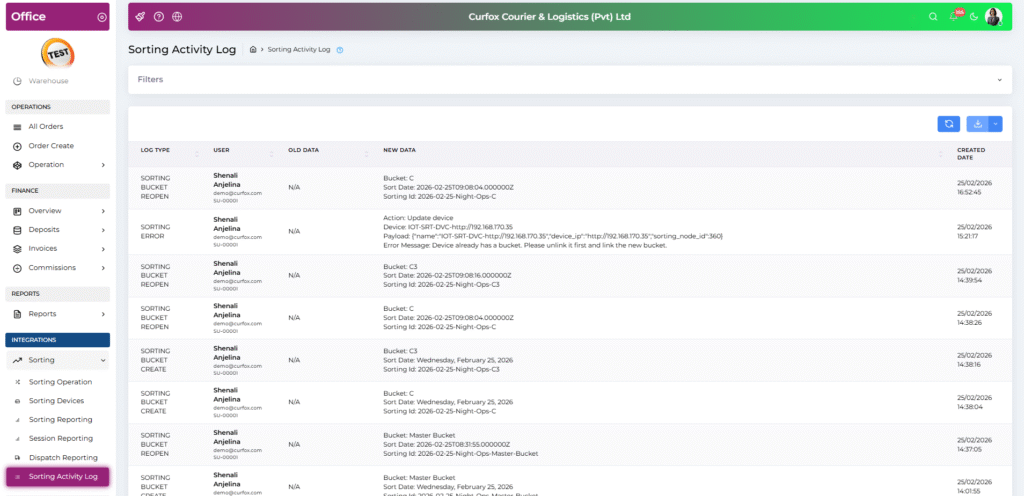
๐Ÿ“Š Sorting Activity Log System (NEW) #

A comprehensive logging system has been introduced to improve transparency and audit control within sorting operations.

๐Ÿ“ Location:
Staff Portal โ†’ Integrations โ†’ Sorting โ†’ Sorting Activity Log

๐Ÿ” Data Tracked:

  • Opening & re-opening of sorting sessions
  • Adding & editing sorting devices (Device ID, IP Address, Device Name)
  • Order dispatches from sub-buckets (A1, B2, C3, etc.)
  • Sorting system errors and payload logs during sorting

๐Ÿ“‹ Table Includes:

  • Log Type
  • User Details (Name, Email, Employee Number)
  • Old Data vs. New Data comparison
  • Exact Date & Time

๐Ÿ›  Utilities:

  • Date range filter
  • Downloadable log export (Audit-ready)

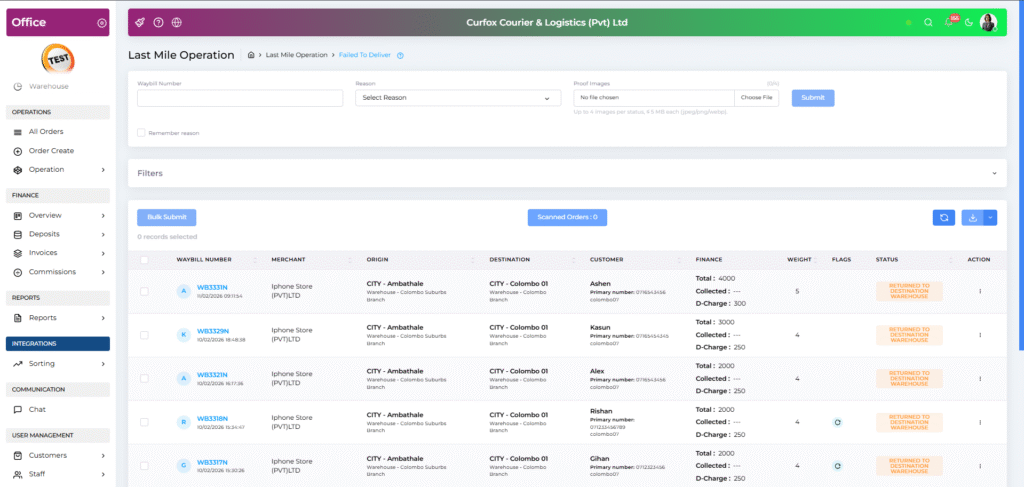
๐Ÿ“ธ Proof Upload for โ€œFailed to Deliver.โ€ #

Staff can now upload supporting evidence when marking orders as Failed to Deliver.

๐Ÿ“Ž Upload Constraints:

  • Maximum 4 images
  • Maximum 5MB per image

๐Ÿ”„ Workflow:

  • Preview images before submission
  • Delete images if needed
  • Proof accessible via the View Order modal after submission

This enhances dispute resolution and audit compliance. ๐Ÿ›ก

Improvements #

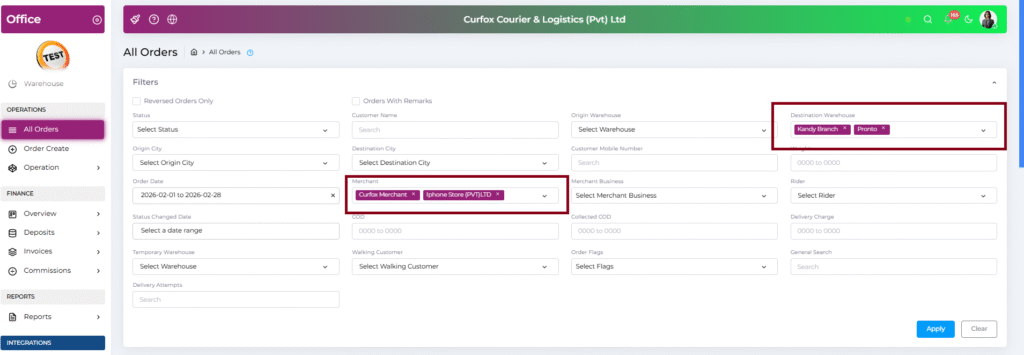
๐Ÿ”Ž Multi-Select Filters in โ€œAll Ordersโ€ Table #

Enhanced filtering capabilities for complex data analysis.

โœ” Users can now:

  • Select multiple Merchants
  • Select multiple Destination Warehouses

๐Ÿง  Dynamic Filtering Logic:

  • When multiple merchants are selected, the Merchant Business dropdown auto-filters to display only related businesses.
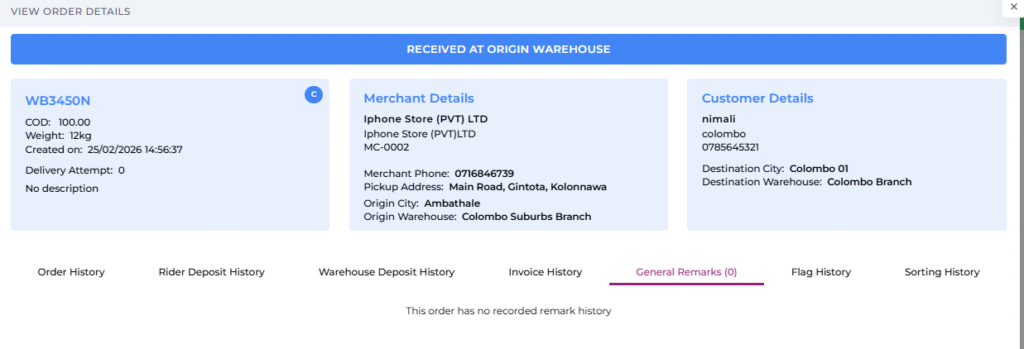
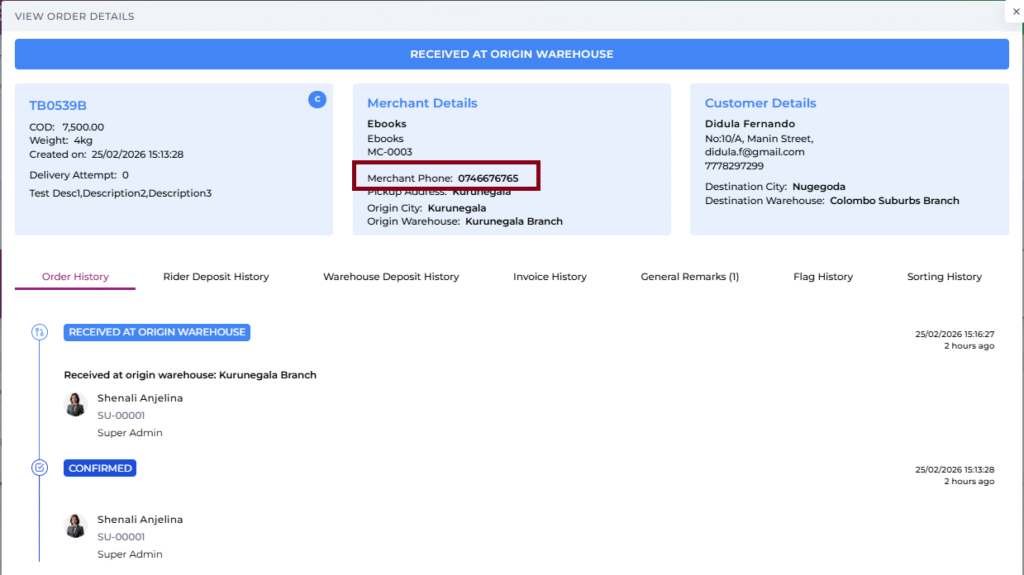
๐Ÿ“ž Enhanced Merchant Details #

The Merchant Phone Number is now visible in the View Order modal.

๐Ÿ“ Located under:

  • Merchant Details
  • Alongside Pickup Address & City

Enables faster merchant communication.
โœ Conditional โ€œView Signatureโ€ Button in Delivered Status #

To improve UX clarity:

  • The View Signature button now appears only if a signature exists for delivered orders.
  • If no signature was captured, the button remains hidden.

๐Ÿ“ Optimized Remarks Loading #

Improved user experience in the General Remarks tab.

๐Ÿ”„ Previously: Endless loading spinner
โœ… Now: Displays message

โ€œThis order has no record remark history.โ€

๐Ÿ” OCR API Configuration Management #

The OCR โ€œScan Image Uploadโ€ API configuration has been moved to the .env file.

๐ŸŽฏ Benefits:

  • Improved security
  • Better performance
  • Easier environment management (Dev / Staging / Production)

Bugs #

๐Ÿ” Order Status Duplication Issue Fix #

Fixed a critical issue where:

  • Long waybill series
  • Auto-Submit enabled

Could cause duplicate status entries.

โœ… Now prevents:

  • Double submission
  • Duplicate status history records
  • In These Statuses
  • PICKED UP FROM MERCHANT
  • DISPATCH TO ORIGIN WAREHOUSE
  • RECEIVED AT DESTINATION WAREHOUSE
  • DELIVERED
  • RETURN TO SORTING WAREHOUSE
  • RECEIVED TO SORTING WAREHOUSE (FAILED TO DELIVER)
  • RETURN TO MERCHANT
  • RECEIVED FAILED BY WALKING CUSTOMER
  • RETURN DISPATCHED TO ORIGIN WAREHOUSE
  • RETURN TO SORTING WAREHOUSE (INVALID DESTINATION)
  • RECEIVED TO ORIGIN WAREHOUSE (FAILED TO RETURN)
  • DISPATCH TO DESTINATION WAREHOUSE
  • RECEIVED AT SORTING WAREHOUSE
  • RECEIVE FAILED ORDER
  • CANCELLED

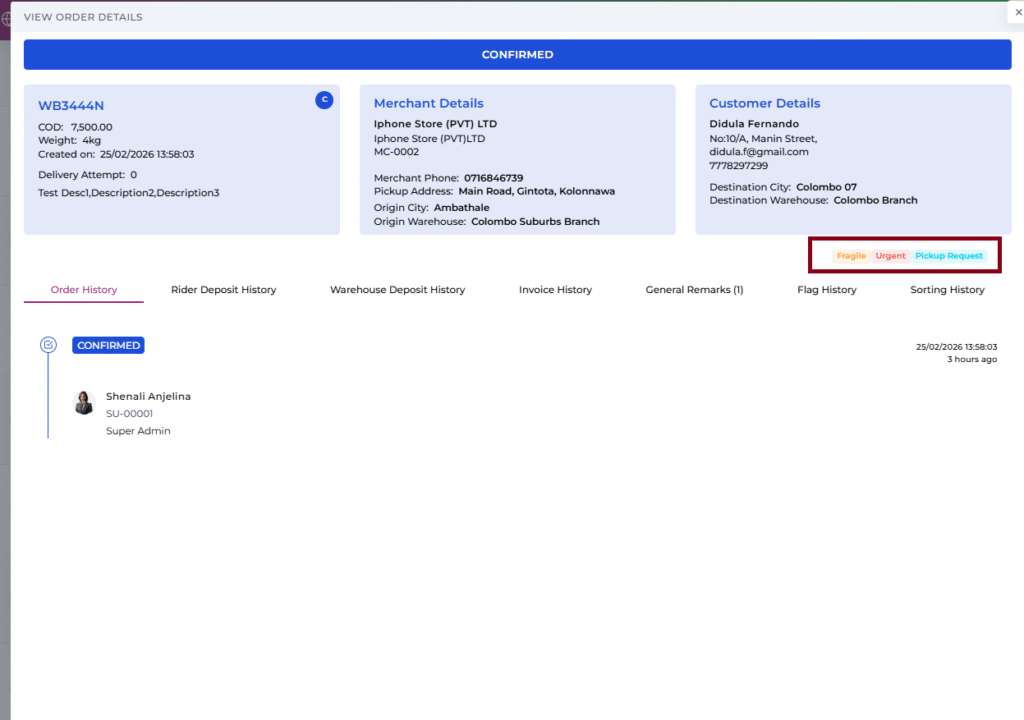
๐Ÿšฉ Order Flag Visibility #

Resolved issue where order flags (Urgent, Future Delivery, etc.) were not appearing in the View Order header.

โœ” Flags now visible to:

  • Staff
  • Merchants

๐Ÿ’ฐ Rider Commission Display #

Fixed front-end issue in Staff Management Rider Role.

๐Ÿ”ง Previously:

  • The commission column always showed โ€œNoโ€

โœ… Now:

  • Correctly reflects โ€œYes/Noโ€ based on rider configuration.

๐Ÿ“Š Excel Export Alignment #

Resolved alignment issue in Single Page Excel exports.

โŒ Previously:

  • Special characters (#, -, ,) in descriptions caused row break issues.

โœ… Now:

  • Data sanitization ensures proper single-row alignment for every order.

Updated on February 25, 2026

What are your Feelings

  • Happy
  • Normal
  • Sad

Share This Article :

  • Facebook
  • X
  • LinkedIn
  • Pinterest
Release Note โ€“ Version V3.39.0Pre Release Note V3.38.0.13

Powered by BetterDocs

Leave a Reply Cancel reply

Your email address will not be published. Required fields are marked *

Table of Contents
  • New Feature
    • ๐Ÿ“Š Sorting Activity Log System (NEW)
    • ๐Ÿ“ธ Proof Upload for โ€œFailed to Deliver.โ€
  • Improvements
    • ๐Ÿ”Ž Multi-Select Filters in โ€œAll Ordersโ€ Table
    • ๐Ÿ“ž Enhanced Merchant Details
    • โœ Conditional โ€œView Signatureโ€ Button in Delivered Status
    • ๐Ÿ“ Optimized Remarks Loading
    • ๐Ÿ” OCR API Configuration Management
  • Bugs
    • ๐Ÿ” Order Status Duplication Issue Fix
    • ๐Ÿšฉ Order Flag Visibility
    • ๐Ÿ’ฐ Rider Commission Display
    • ๐Ÿ“Š Excel Export Alignment

ยฉ 2025 Curfox Docs - All Rights Reserved Parallax Technologies