Skip to content

Curfox Docs

Curfox Docs

Back to Web

Release Note 3.38.0.10

HomeRelease Note 3.38.0.10

RELEASE NOTES

49
  • Pre Release Note V3.33.0
  • Release Note V3.32.0
  • Release Note V3.31.0
  • Release Note V3.30.0
  • Release Note V3.29.0
  • Release Note V3.28.0
  • Release Note V3.27.0
  • Release Note V3.26.0
  • Release Note V3.25.0
  • Release Note V3.24.0
  • LOGIN AND START THE JOURNEY WITH CURFOX
  • Introduction to Curfox
  • What Intricate Ecosystems Thrive Along the Banks of Rivers?
  • 🚀 New Feature Release: Billing City Override Setting
  • 🚀 Enhanced SMS Notifications for Rescheduled Deliveries
  • 🚀Bypass ‘Dispatch from Origin Warehouse’ Status for Invalid Destination Cases
  • 🚀Sorting History for Enhanced Tracking
  • 🚀Enhanced SMS Provider Configuration
  • 🚀Rate Card Approval Option – Phase 1
  • 🚀Warehouse Sorting Device Management
  • 🚀WhatsApp Messaging Integration
  • 🚀Proof Upload Feature
  • 🚀Filter Saving Option
  • 🚀 Release Note: V3.44.0
  • 🚀 Release Note: V3.43.0
  • 🚀 Release Note: Status Customization Feature
  • 🚀 Release Note: Route Optimization Module – Web
  • Release Note – Version V3.39.0
  • 🚀 Release Note: Instadispatch Courier Integration📅
  • Release Note – Customer Data Security Module
  • Release Note – V3.38.11.1
  • Pre Release Note – V3.38.0.14
  • 🚀 Pre Release Note – V3.38.11
  • Pre Release Note V3.38.0.13
  • 🚀 Release Note : Add Redelivery Flag for Failed to Deliver
  • Release Note : New Curfox Rider App
  • Release Note 3.38.0.12
  • Release Note – 3.38.10
  • Release Note 3.38.0.10
  • 📌 Release Note: Redelivery Flag for Verify Failed to Deliver
  • Release 3.38.07
  • Release 3.38.08
  • 🚚 Release Note: New Dispatch Reporting Module
  • Release Note V3.38.0.6
  • 🚀 Flag Management Feature
  • 🚀New Status for Status Flow “Verify Failed to Deliver”
  • 🚀 Image Scan Upload
  • 🚀Geofencing Module
  • Release Note V3.38.6

RIDER APP

2
  • User Guide
  • Release Note : New Curfox Rider App

LOCAL RELEASE NOTES

12
  • 🚀 Release Note: V3.44.0
  • 🚀 Release Note: V3.43.0
  • 🚀 Release Note: Status Customization Feature
  • Release Note – Version V3.39.0
  • Pre Release Note – V3.38.0.14
  • Pre Release Note V3.38.0.13
  • 🚀 Release Note : Add Redelivery Flag for Failed to Deliver
  • Release Note : New Curfox Rider App
  • Release Note 3.38.0.12
  • 📌 Release Note: Redelivery Flag for Verify Failed to Deliver
  • Release Note 3.38.0.10
  • 🚀 Pre-Deposit Merchant Invoice Approval Process

INTERNATIONAL RELEASE NOTES

7
  • 🚀 Release Note: Status Customization Feature
  • 🚀 Release Note: Route Optimization Module – Web
  • 🚀 Release Note: Instadispatch Courier Integration📅
  • Release Note – Customer Data Security Module
  • Release Note – V3.38.11.1
  • 🚀 Pre Release Note – V3.38.11
  • Release Note – 3.38.10

MERCHANT PORTAL

1
  • LOGIN AND START THE JOURNEY WITH CURFOX

STAFF PORTAL

1
  • LOGIN AND START THE JOURNEY WITH CURFOX

OVERVIEW

1
  • Introduction to Curfox

USER GUIDES

1
  • 📚User Guide: WhatsApp Message API Setup
View Categories
  • Home
  • Docs
  • RELEASE NOTES
  • LOCAL RELEASE NOTES
  • Release Note 3.38.0.10

Release Note 3.38.0.10

3 min read

New Features #

1️⃣ Rider Parcel Assignment Management #

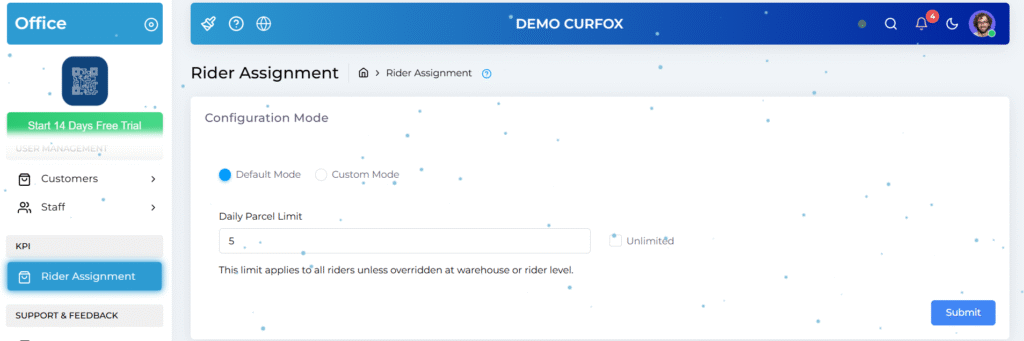
This release introduces a flexible parcel assignment limit system to prevent rider overload and ensure fair workload distribution.

How it works

  • 24-Hour Limit Logic: Define the maximum number of parcels a rider can be assigned within a rolling 24-hour window.

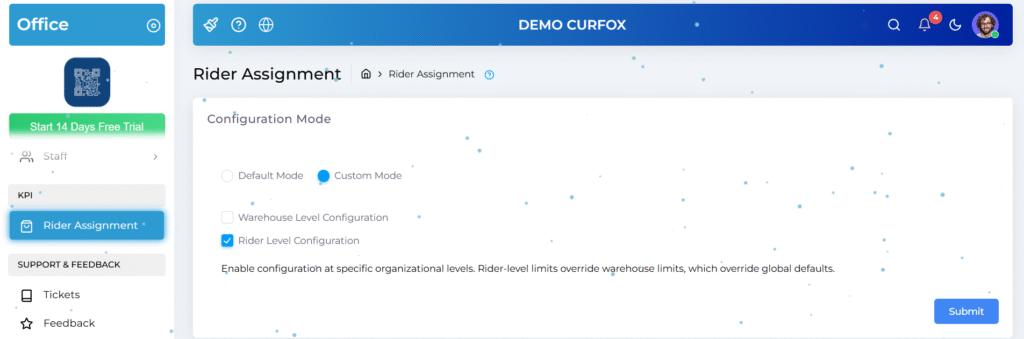
Configuration Levels

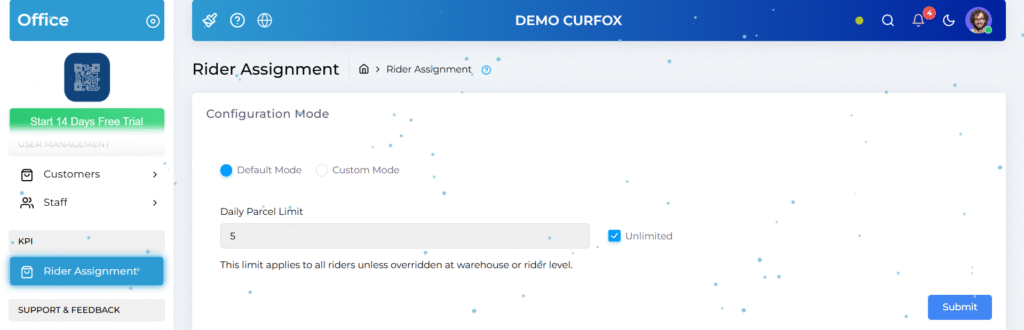
  • System Default (Global):
    Set a fixed daily limit (e.g., 50 parcels) or choose Unlimited to disable limits system-wide.
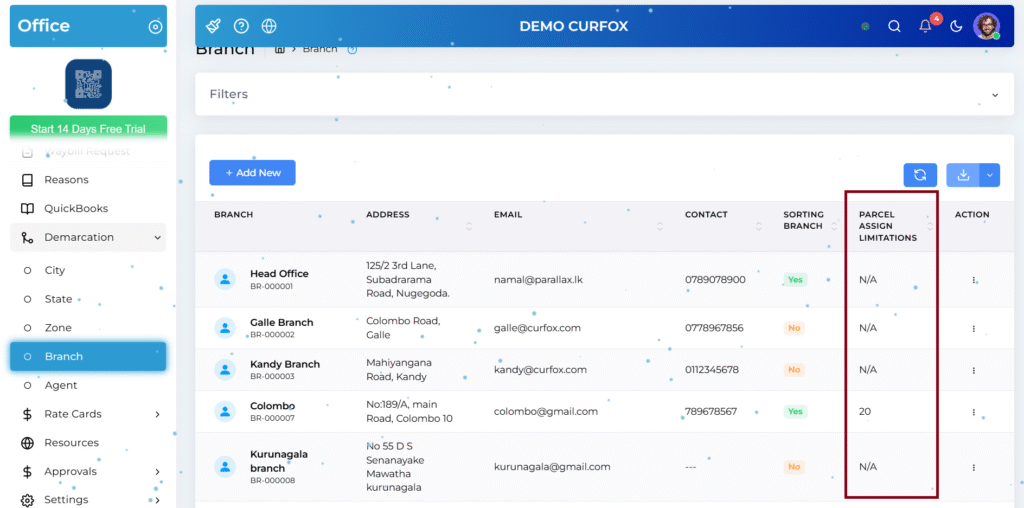
  • Warehouse-Level Override:
    Path: Demarcation → Branch
    Customize limits per branch (e.g., higher limits for Colombo, lower for rural branches). If the branch does not set such a limit, it will support unlimited assignments.
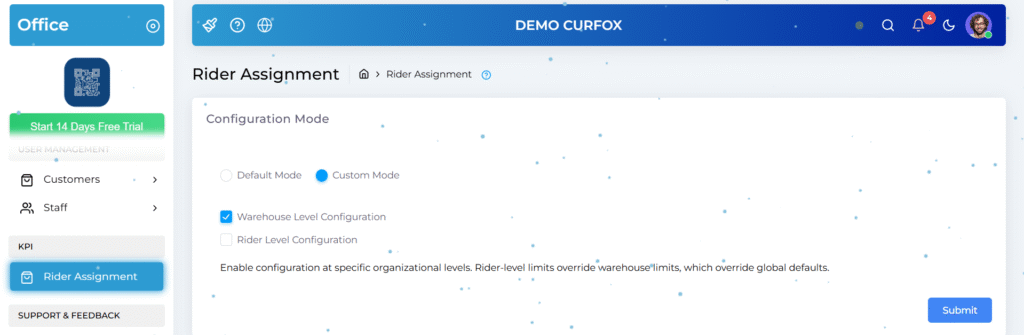
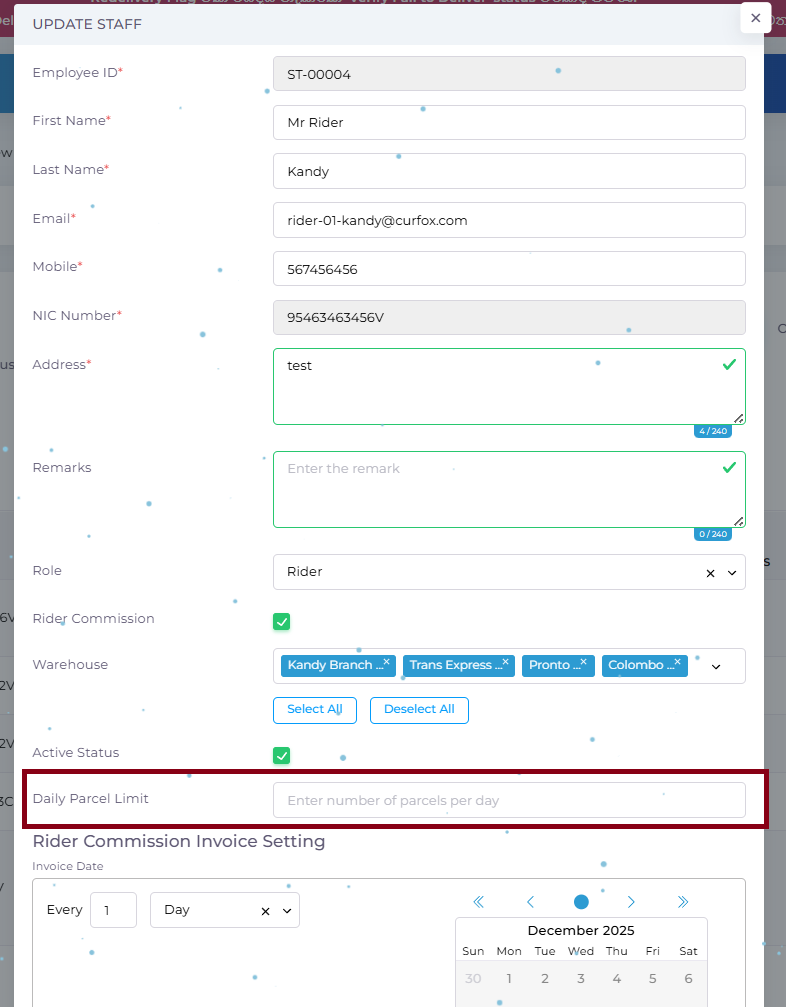
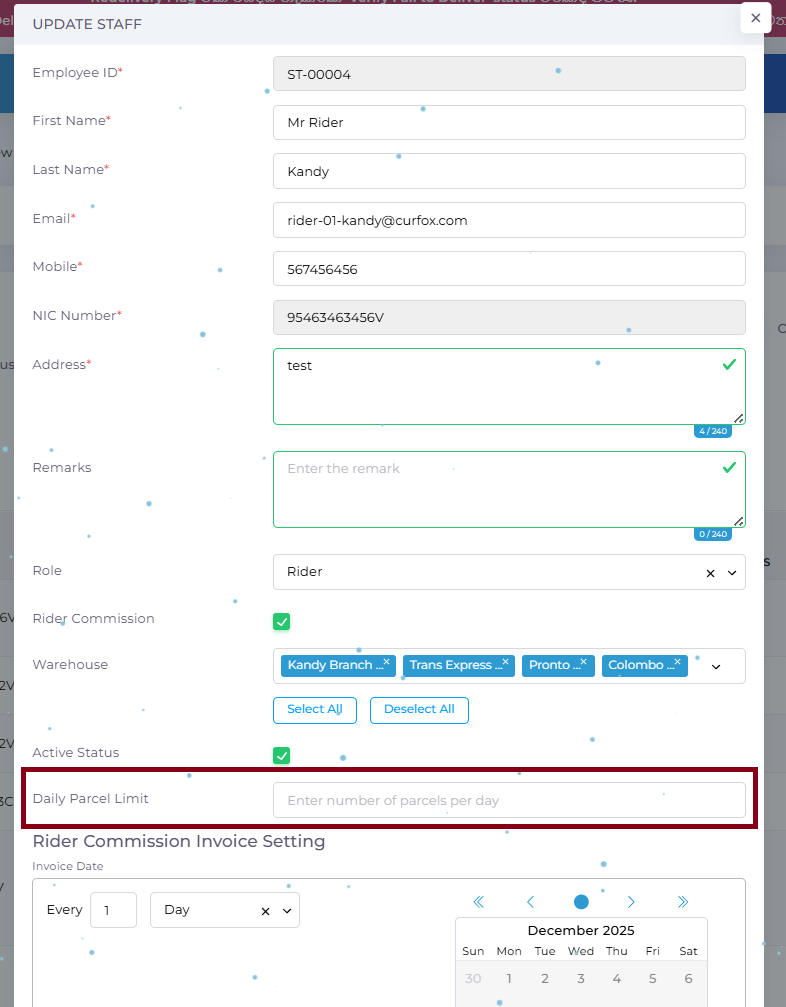
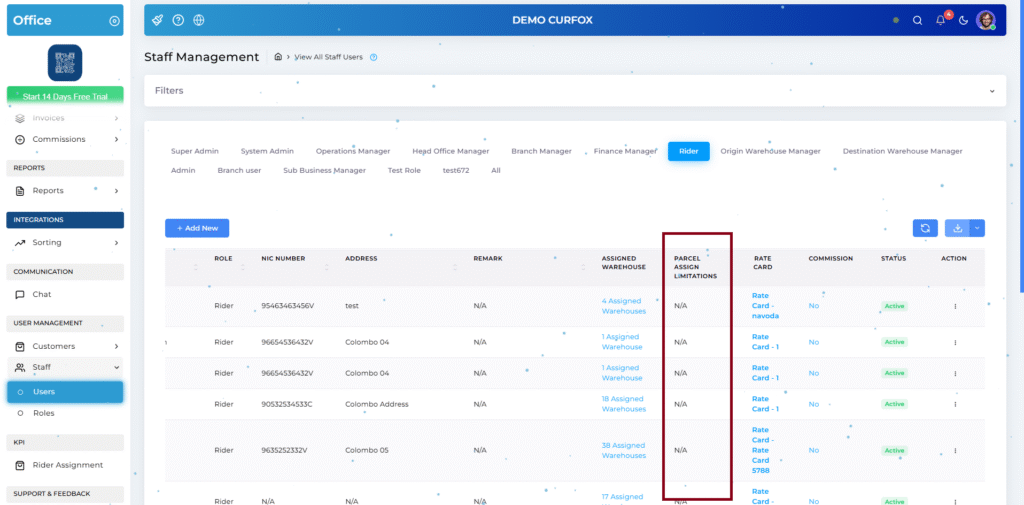
  • Rider-Level Override:
    Path: Staff Management → Users → Rider Role
    Assign custom limits to high-capacity riders, overriding both system and warehouse rules. If the rider does not set such a limit, it will support unlimited assignments.
Built-in Protection

  • When a rider reaches their daily limit, assignment attempts are blocked with a clear alert:
    “Assignment Failed: Rider has reached their daily limit of [X] parcels.”

⚠️ Important Recommendation #

For best operational consistency, we strongly recommend configuring:

  • Rider Parcel Limits

👉 At the start of the business day.

2️⃣ Automated Reporting: Pending Status Email #

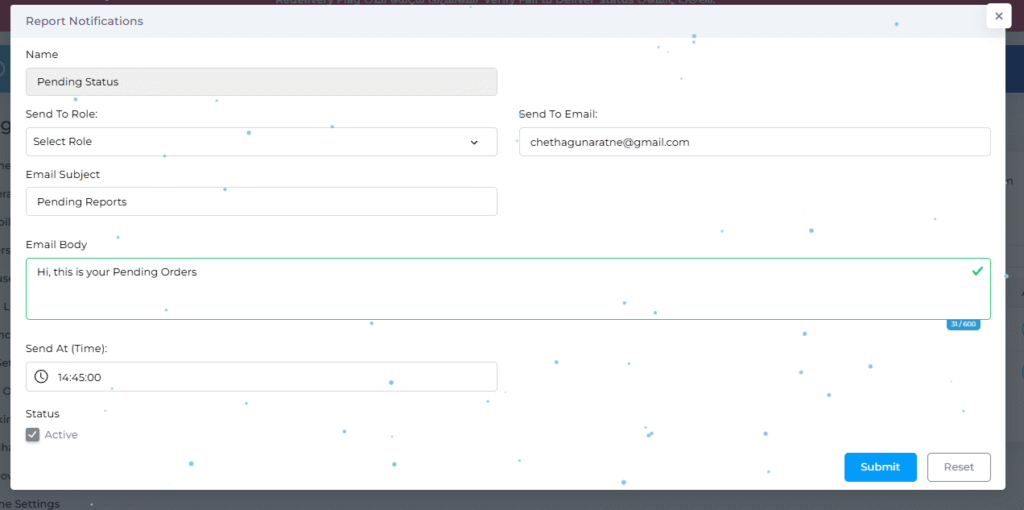
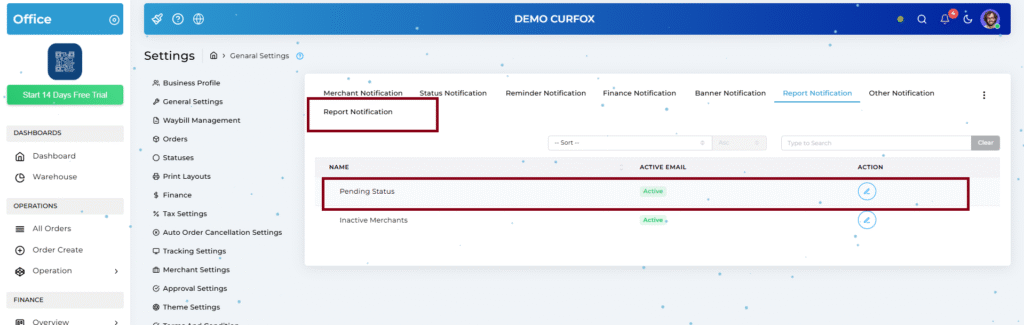
To improve visibility into operational bottlenecks, we’ve introduced automated Pending Status Reports.

Trigger Logic

  • Identifies orders that have not reached an End Status:
    Delivered, Partially Delivered, Returned to Merchant

Automation Features

  • Scheduled Email Dispatch: Receive daily summaries at a defined time.
  • Flexible Recipients: Send to system roles (e.g., Operations Manager) or custom email addresses.
  • Custom Content: Fully editable subject line and email body.

Configuration Path
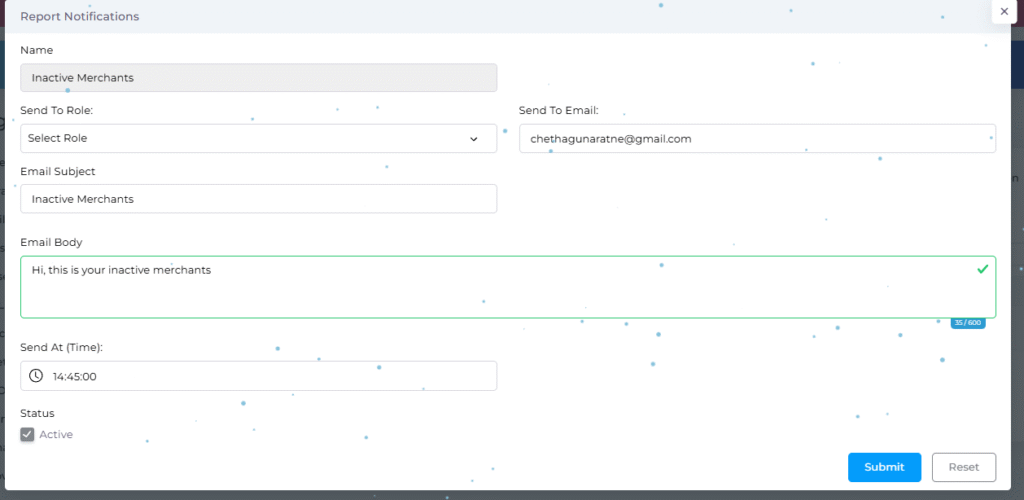
Administration → Settings → General → Notifications → Report Notification

3️⃣ Automated Reporting: Inactive for 3 Days Merchants’ Email Task #

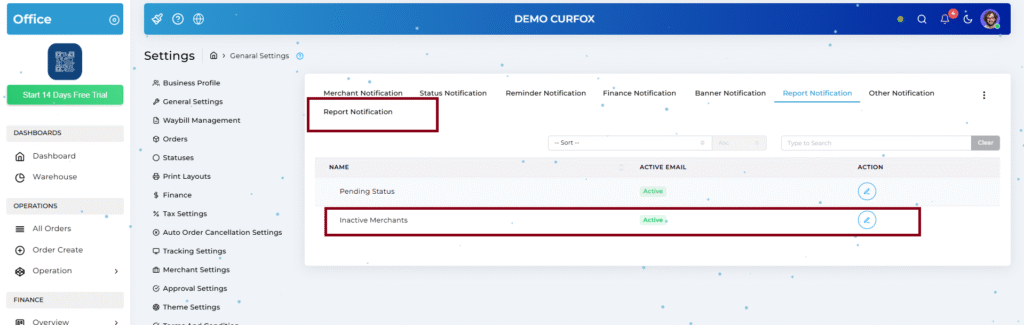
A new CRM-focused report to help teams identify and re-engage inactive merchants.

Trigger Logic

  • Detects merchants with no new orders for 3 consecutive days.

Purpose

  • Enables proactive follow-ups to identify technical issues or business churn.

Configuration

  • Recipient list, email content, and trigger time are fully customizable.
  • Requirement: SMTP / Email settings must be configured and tested.
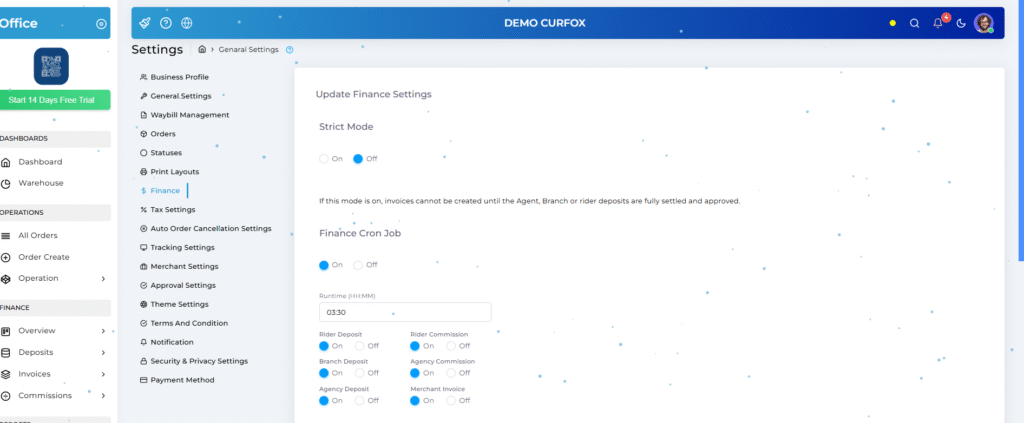
4️⃣ Selective Financial Cron Jobs #

We’ve unbundled financial background processes to give finance teams granular control.

Independent Toggles Available

  • Rider Deposit & Rider Commission Calculation
  • Branch Deposit & Agency Commission Calculation
  • Merchant Invoice Generation

Key Benefit

  • Disable non-critical jobs during peak hours to reduce server load and improve overall system responsiveness.

Configuration Path
Administration → Settings → Finance

⚠️ Important Recommendation #

For best operational consistency, we strongly recommend configuring:

  • Financial Cron Job Toggles

👉 At the start of the business day.

Improvements #

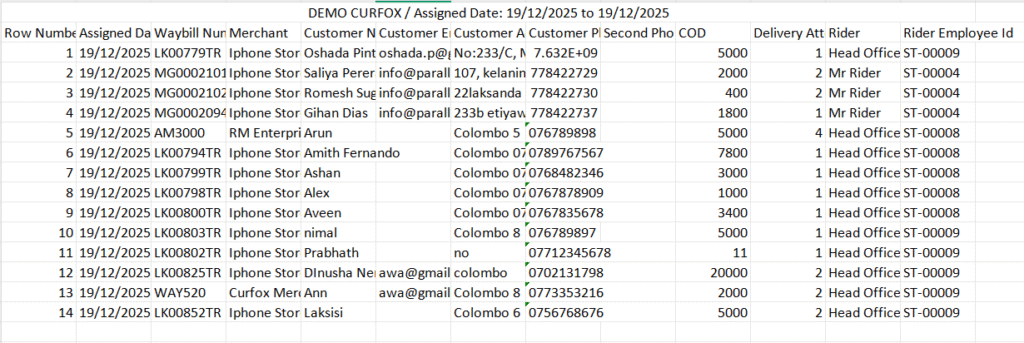
5️⃣ Enhanced Excel Exports for Assigned Orders #

Assigned Orders exports have been redesigned for better auditing and professionalism.

What’s New

  • Branding: System name (e.g., Demo Curfox) displayed at the top.
  • Contextual Metadata: Clearly shows Report Type and Date Range.
  • Row Number Column: Makes referencing records easier during audits and reviews.
6️⃣ Redelivery Flag in Verify Failed to Deliver #

We’ve streamlined the Failed Attempt → Reschedule workflow.

Previous Limitation

  • Mandatory verification time blocked immediate rescheduling from Verify Failed to Deliver.

New Behavior

  • When the Redelivery Flag is present:
    • Verification hold-period is bypassed.
    • Orders can be moved immediately to Rescheduled.

Outcome

  • Faster recovery from failed attempts and reduced operational delays.
Updated on January 17, 2026

What are your Feelings

  • Happy
  • Normal
  • Sad

Share This Article :

  • Facebook
  • X
  • LinkedIn
  • Pinterest
📌 Release Note: Redelivery Flag for Verify Failed to Deliver🚀 Pre-Deposit Merchant Invoice Approval Process

Powered by BetterDocs

Leave a Reply Cancel reply

Your email address will not be published. Required fields are marked *

Table of Contents
  • New Features
    • 1️⃣ Rider Parcel Assignment Management
    • ⚠️ Important Recommendation
    • 2️⃣ Automated Reporting: Pending Status Email
    • 3️⃣ Automated Reporting: Inactive for 3 Days Merchants' Email Task
    • 4️⃣ Selective Financial Cron Jobs
    • ⚠️ Important Recommendation
  • Improvements
    • 5️⃣ Enhanced Excel Exports for Assigned Orders
    • 6️⃣ Redelivery Flag in Verify Failed to Deliver

© 2025 Curfox Docs - All Rights Reserved Parallax Technologies