Skip to content

Curfox Docs

Curfox Docs

Back to Web

๐Ÿš€New Status for Status Flow “Verify Failed to Deliver”

Home๐Ÿš€New Status for Status Flow “Verify Failed to Deliver”

RELEASE NOTES

49
  • Pre Release Note V3.33.0
  • Release Note V3.32.0
  • Release Note V3.31.0
  • Release Note V3.30.0
  • Release Note V3.29.0
  • Release Note V3.28.0
  • Release Note V3.27.0
  • Release Note V3.26.0
  • Release Note V3.25.0
  • Release Note V3.24.0
  • LOGIN AND START THE JOURNEY WITH CURFOX
  • Introduction to Curfox
  • What Intricate Ecosystems Thrive Along the Banks of Rivers?
  • ๐Ÿš€ New Feature Release: Billing City Override Setting
  • ๐Ÿš€ Enhanced SMS Notifications for Rescheduled Deliveries
  • ๐Ÿš€Bypass ‘Dispatch from Origin Warehouse’ Status for Invalid Destination Cases
  • ๐Ÿš€Sorting History for Enhanced Tracking
  • ๐Ÿš€Enhanced SMS Provider Configuration
  • ๐Ÿš€Rate Card Approval Option – Phase 1
  • ๐Ÿš€Warehouse Sorting Device Management
  • ๐Ÿš€WhatsApp Messaging Integration
  • ๐Ÿš€Proof Upload Feature
  • ๐Ÿš€Filter Saving Option
  • ๐Ÿš€ Release Note: V3.44.0
  • ๐Ÿš€ Release Note: V3.43.0
  • ๐Ÿš€ Release Note: Status Customization Feature
  • ๐Ÿš€ Release Note: Route Optimization Module – Web
  • Release Note โ€“ Version V3.39.0
  • ๐Ÿš€ Release Note: Instadispatch Courier Integration๐Ÿ“…
  • Release Note – Customer Data Security Module
  • Release Note – V3.38.11.1
  • Pre Release Note – V3.38.0.14
  • ๐Ÿš€ Pre Release Note – V3.38.11
  • Pre Release Note V3.38.0.13
  • ๐Ÿš€ Release Note : Add Redelivery Flag for Failed to Deliver
  • Release Note : New Curfox Rider App
  • Release Note 3.38.0.12
  • Release Note – 3.38.10
  • Release Note 3.38.0.10
  • ๐Ÿ“Œ Release Note: Redelivery Flag for Verify Failed to Deliver
  • Release 3.38.07
  • Release 3.38.08
  • ๐Ÿšš Release Note: New Dispatch Reporting Module
  • Release Note V3.38.0.6
  • ๐Ÿš€ Flag Management Feature
  • ๐Ÿš€New Status for Status Flow “Verify Failed to Deliver”
  • ๐Ÿš€ Image Scan Upload
  • ๐Ÿš€Geofencing Module
  • Release Note V3.38.6

RIDER APP

2
  • User Guide
  • Release Note : New Curfox Rider App

LOCAL RELEASE NOTES

12
  • ๐Ÿš€ Release Note: V3.44.0
  • ๐Ÿš€ Release Note: V3.43.0
  • ๐Ÿš€ Release Note: Status Customization Feature
  • Release Note โ€“ Version V3.39.0
  • Pre Release Note – V3.38.0.14
  • Pre Release Note V3.38.0.13
  • ๐Ÿš€ Release Note : Add Redelivery Flag for Failed to Deliver
  • Release Note : New Curfox Rider App
  • Release Note 3.38.0.12
  • ๐Ÿ“Œ Release Note: Redelivery Flag for Verify Failed to Deliver
  • Release Note 3.38.0.10
  • ๐Ÿš€ Pre-Deposit Merchant Invoice Approval Process

INTERNATIONAL RELEASE NOTES

7
  • ๐Ÿš€ Release Note: Status Customization Feature
  • ๐Ÿš€ Release Note: Route Optimization Module – Web
  • ๐Ÿš€ Release Note: Instadispatch Courier Integration๐Ÿ“…
  • Release Note – Customer Data Security Module
  • Release Note – V3.38.11.1
  • ๐Ÿš€ Pre Release Note – V3.38.11
  • Release Note – 3.38.10

MERCHANT PORTAL

1
  • LOGIN AND START THE JOURNEY WITH CURFOX

STAFF PORTAL

1
  • LOGIN AND START THE JOURNEY WITH CURFOX

OVERVIEW

1
  • Introduction to Curfox

USER GUIDES

1
  • ๐Ÿ“šUser Guide: WhatsApp Message API Setup
View Categories
  • Home
  • Docs
  • RELEASE NOTES
  • ๐Ÿš€New Status for Status Flow “Verify Failed to Deliver”

๐Ÿš€New Status for Status Flow “Verify Failed to Deliver”

3 min read

We are excited to announce a major enhancement to the delivery exception handling process with the introduction of a new verification step in the โ€œFail to Deliverโ€ workflow. This improvement ensures greater accuracy, transparency, and accountability across delivery operations, benefiting both staff and merchants.

The newly introduced status โ€” Verify Fail to Deliver โ€” adds a mandatory verification stage before a failed delivery can be moved to return statuses. This update strengthens communication, clarifies operational stages, and prevents premature returns.


Whatโ€™s New #

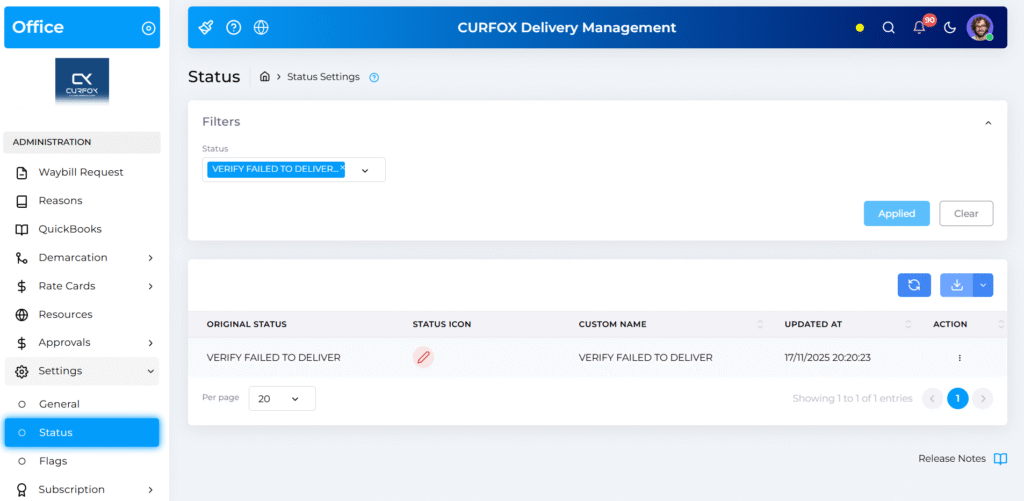
โœ… New Order Status: Verify Fail to Deliver #

A new intermediary status has been added to the order workflow.
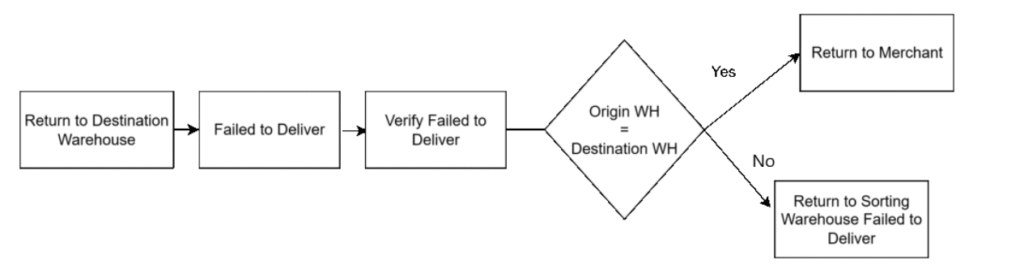
All orders marked as Failed to Deliver must now pass through the Verify Fail to Deliver stage before proceeding to return-related statuses.
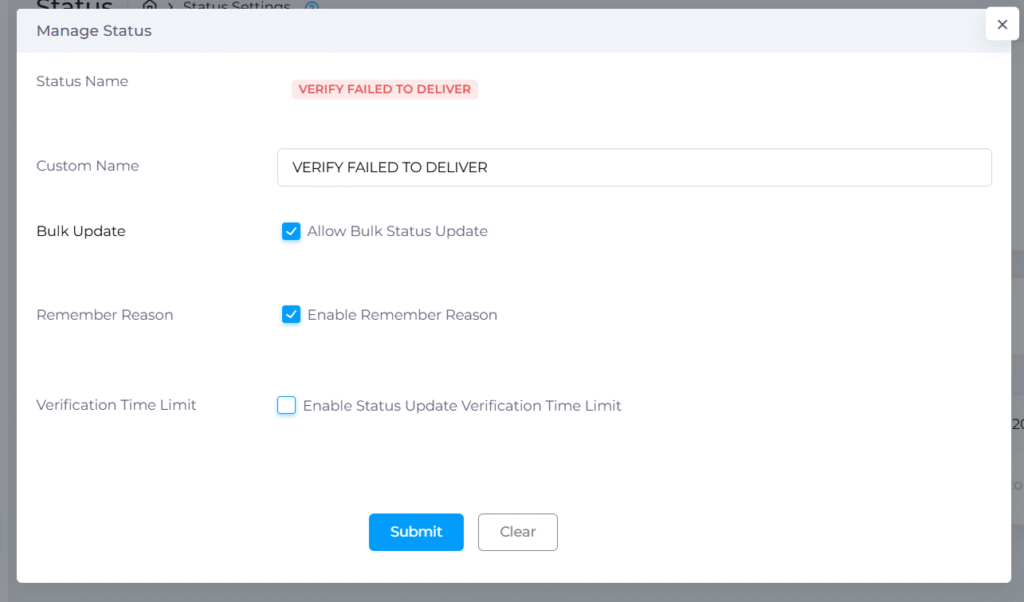
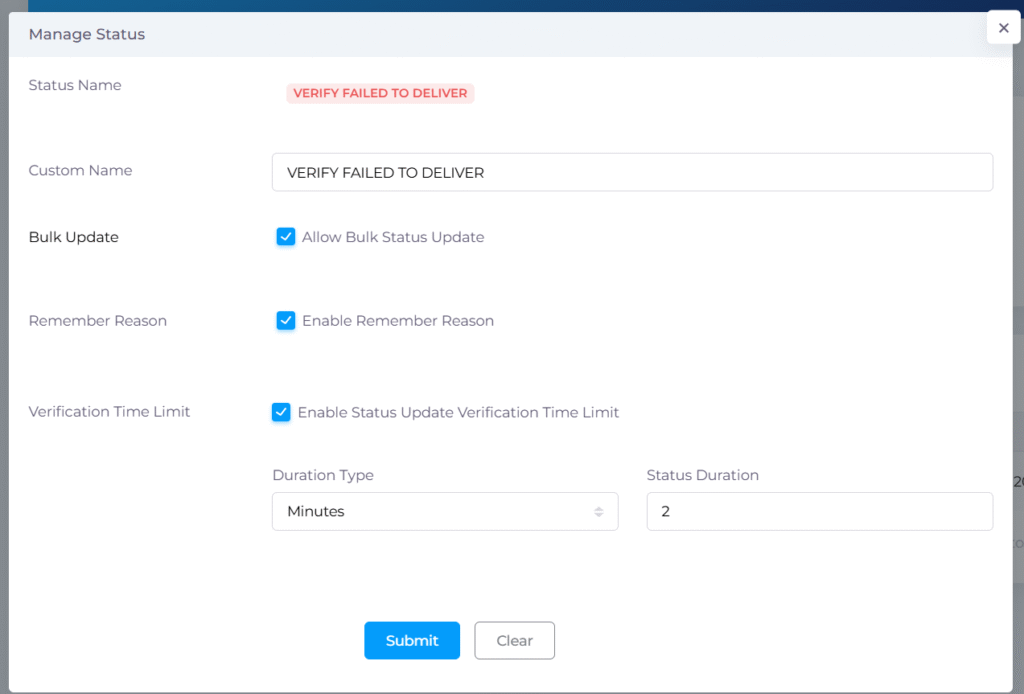
โฑ Verification Time Limit Configuration #

You can now configure a Verification Time Limit (in minutes, hours, or days), during which the order must remain in the verification stage.

  • This allows your team time to investigate the delivery failure.
  • If no time is configured, staff may move the order forward without a mandatory waiting period.
How It Works #

๐Ÿ“ Previous Workflow (Before Release) #

When a delivery attempt failed and the parcel returned to the destination warehouse, staff had two actions:

  • Reschedule the order, or
  • Mark it as Fail to Deliver, after which it directly proceeded to return handling. (Return to Sorting Warehouse Failed to Deliver)

This sometimes led to gaps in communication or insufficient verification before returning parcels.
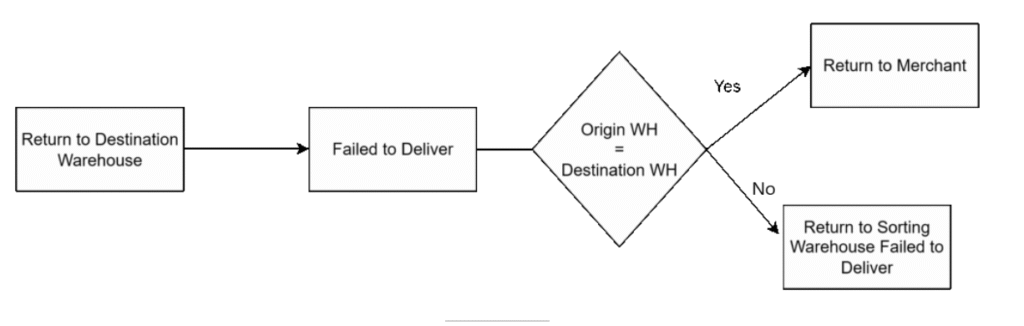

๐Ÿ“ New Workflow (After Release) #

  1. Failed Delivery Occurs
    The rider returns the parcel to the destination warehouse.
  2. Move Failed to deliver Orders to โ€œVerify Fail to Deliverโ€ status Before “Return to Sorting Warehouse Failed to Deliver” Or “Return to Merchant”
    Instead of immediately moving to return statuses from failed to deliver status, warehouse staff must now move the order to the new Verify Fail to Deliver status.
  3. Verification Period Begins
    The order remains in this stage for the configured verification duration.
    During this time, the team can:
    • Investigate the cause of the failed delivery
    • Contact the customer or merchant
    • Document the failure reason or supporting details
  4. Proceed to Next Status
    After verification time has passed, staff may move the order to the next appropriate status, such as:
    • Returned to Sorting Warehouse (Failed to Deliver)
    • Return to Merchant

๐Ÿ“ Important Notes #

  • Orders cannot skip the verification stage.
  • But you can skip setting the verification time period (Not recommended)
  • Return-related statuses will only become updateable after the verification period ends.
  • Both staff and merchants can see this status and the remaining time, improving visibility across teams.

โœ๏ธ Benefits #

โœ” Improved Transparency #

Every failed delivery now passes through a clearly visible verification stage, ensuring no steps are missed.

โœ” Stronger Client Communication #

The dedicated verification window allows teams to contact clients promptly and potentially resolve issues without initiating returns.

โœ” Structured Exception Handling #

The update enforces a more consistent and accountable workflow, reducing errors and improving operational quality.


Conclusion #

The new Verify Fail to Deliver workflow introduces a more reliable and informative process for managing failed deliveries. By ensuring that each case is properly reviewed, this feature enhances customer experience, minimizes unnecessary returns, and provides complete clarity for staff and merchants.

Updated on November 18, 2025

What are your Feelings

  • Happy
  • Normal
  • Sad

Share This Article :

  • Facebook
  • X
  • LinkedIn
  • Pinterest
๐Ÿš€ Flag Management Feature๐Ÿš€ Image Scan Upload

Powered by BetterDocs

Leave a Reply Cancel reply

Your email address will not be published. Required fields are marked *

Table of Contents
  • Whatโ€™s New
    • โœ… New Order Status: Verify Fail to Deliver
    • โฑ Verification Time Limit Configuration
  • How It Works
    • ๐Ÿ“ Previous Workflow (Before Release)
    • ๐Ÿ“ New Workflow (After Release)
    • ๐Ÿ“ Important Notes
  • โœ๏ธ Benefits
    • โœ” Improved Transparency
    • โœ” Stronger Client Communication
    • โœ” Structured Exception Handling
  • Conclusion

ยฉ 2025 Curfox Docs - All Rights Reserved Parallax Technologies