New Feature #
1. 🆕 Debit Note #
Debit Notes can be generated for eligible orders that have been returned to the merchant or have a Receive Failed Orders status.
This feature provides a structured and transparent process for managing return-related charges from invoice generation through final payment approval. ✅
Key Conditions for Debit Note Generation #
Before a Debit Note can be created, the following conditions must be met:
- 🧾 Invoice Generated: The order must already have an invoice.
- 🔄 Eligible Order Status: The order must have one of the following statuses:
- Return to Merchant
- Receive Failed Orders
- 💰 Return Charges Available: The system identifies invoices containing applicable return charges.
⚙️ How to Generate Debit Notes #
Debit Notes can be generated in two ways:
🤖 A. Automatic Generation #
The system will automatically generate Debit Notes for all eligible merchants on the 1st day of every month at 6:00 AM. ⏰📅
This ensures a consistent and hassle-free monthly billing cycle.
🖱️ B. Manual Generation #
Debit Notes can also be generated manually when required:
- Navigate to Finance > Debit Notes. 💼
- Click Add New Debit Note. ➕
- Select the Merchant and Business. 🏢
- Click Get Invoices.
- Only invoices containing applicable return charges will be displayed. 🔍
- Select the required invoices. ☑️
- Add a remark if necessary. 📝
- Click Generate. 🚀
⚙️ Merchant-Specific Debit Note Configuration #
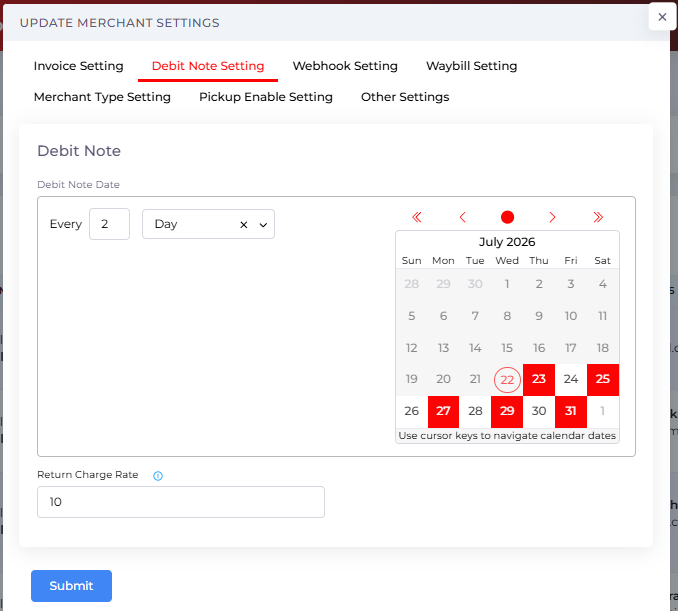
Debit Note settings can be customized for individual merchants. 🏪
📍 Navigation: #
Customers > Merchants > Action > Manage Merchant Settings
🧾 Debit Note Settings #
You can configure:
- 📅 Debit Note Date: Set a specific invoice date for the merchant.
- 📊 Return Charge Percentage: Define the percentage of the return charge to be billed.
💡 Example:
If the return charge is Rs. 800 and the configured percentage is 10%, the Debit Note amount will be Rs. 80.
Setting the percentage to 100% will bill the full return charge amount. 💰
🔄 Debit Note Lifecycle & Status Management #
Once a Debit Note is generated, it can move through the following statuses:
🕒 1. Pending #
The Debit Note has been generated but payment has not yet been completed.
💰 2. Deposited #
Once the merchant makes the payment, use the Make Payment option to:
- 📎 Upload a payment slip, or
- 💳 Select the payment method, such as:
- 💵 Cash
- 🏧 CDM
- 🏦 Bank Transfer
- And other available payment methods
✅❌ 3. Approved / Rejected #
The Finance Team can review the submitted payment:
- ✅ Approved: The payment is approved and the Approved Date is recorded.
- ❌ Rejected: The rejection reason can be viewed from the Action menu.
📊 Actions & Reporting #
The Debit Note table provides several useful actions:
📄 View Debit Note #
Generate a professional PDF containing:
- 🏢 Company logo
- 🏪 Merchant details
- 💰 Charge breakdown
- 📋 Debit Note information
🧾 View Invoices #
View all invoices linked to a specific Debit Note for complete transparency and easy reference. 🔍
🧾 View Payment Slip #
View the payment receipt uploaded during the Make Payment process. 📎
🌟 Key Benefits #
- 🤖 Automation: Reduces manual work through scheduled monthly Debit Note generation.
- 🎯 Accuracy: Ensures that only eligible orders with valid return statuses and invoices are included.
- 🔧 Flexibility: Supports customized return charge percentages for each merchant.
- 🔍 Transparency: Provides a complete audit trail from Debit Note generation to final payment approval.
- 💼 Better Financial Management: Simplifies the tracking and collection of return-related charges.
Improvement #
💰 2. Add COD amount with cents in order creation #
You can now enter more precise Cash on Delivery (COD) amounts. We’ve added support for cents (decimal values) across all our order creation methods. Whether you want to include cents or keep it as a whole number, the choice is yours!
This update is available in:
- ✅ Single Order Creation
- ✅ Bulk Order Creation
- ✅ Excel Upload
- ✅ Image Scan Upload
🔍 3. Refreshed Global Search UI #
Finding what you need just got easier! We’ve updated the Global Search interface to be more user-friendly and efficient.
- ✨ Improved Responsiveness: The search bar now works perfectly across different screen sizes.
- ✨ Faster Experience: Optimized to prevent system lag and responsiveness issues.
- ✨ Sleek Design: A cleaner look to help you navigate the system effortlessly.



